Feeds:
Posts
Comments

Posts Tagged ‘Business Insider’

These 12 Tips Will Help You Get The Most Out Of Your iPhone

apple iphoneJustin Sullivan/Getty ImagesYou can do a lot with your iPhone. There are plenty of cool features that might not be so obvious. Kind of like finding an Easter egg.

To get the most out of your phone, you just have to know where to find them.

Your phone charges a little faster if it’s in Airplane mode. Swipe up from the bottom of the screen. Tap the airplane icon on the left. Turning this feature on on when you need to charge it a little bit faster.

Your phone charges a little faster if it's in Airplane mode. Swipe up from the bottom of the screen. Tap the airplane icon on the left. Turning this feature on on when you need to charge it a little bit faster.

Screenshot

You can check your app history by double-tapping the iPhone’s home button. A sideways scrolling list will appear on screen. This shows the last apps you used in chronological order.

You can check your app history by double-tapping the iPhone's home button. A sideways scrolling list will appear on screen. This shows the last apps you used in chronological order.

Screenshot

Activate Siri and say “read my email.” Siri will read the name of the sender, time and date, as well as the subject of the email. If you want to reply, Siri will listen to your response and send it for you.

Activate Siri and say "read my email." Siri will read the name of the sender, time and date, as well as the subject of the email. If you want to reply, Siri will listen to your response and send it for you.

Screenshot

Tell Siri to “read iMessages,” too. If you have a new text, Siri tells you who it is from and what it said.

Tell Siri to "read iMessages," too. If you have a new text, Siri tells you who it is from and what it said.

Screenshot

When composing a text or email, shake your phone left and right to quickly undo something you just typed.

When composing a text or email, shake your phone left and right to quickly undo something you just typed.

Screenshot

You can swipe to the left to view time stamps of texts, too.

You can swipe to the left to view time stamps of texts, too.

Screenshot

You can completely block someone from calling you. Find the the contact in your phone book. Tap the name and go to the bottom of the screen. Activate the “Block Caller” feature. That person can’t talk to you at all now.

You can completely block someone from calling you. Find the the contact in your phone book. Tap the name and go to the bottom of the screen. Activate the "Block Caller" feature. That person can't talk to you at all now.

Screenshot

Want some quiet time? Go to Settings > Do Not Disturb. This feature prevents phone calls and alerts from coming through while your phone is locked.
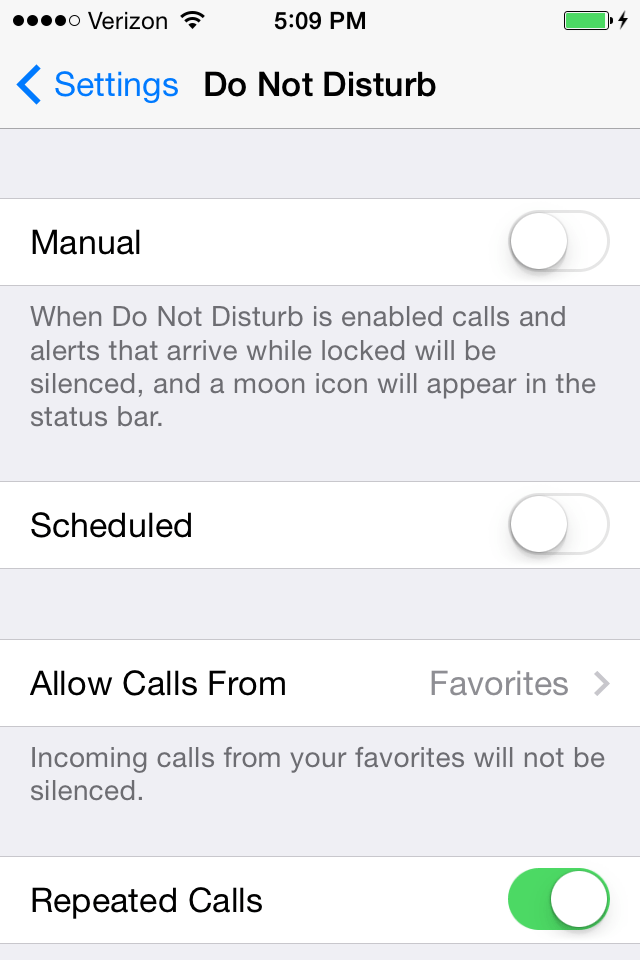
Want some quiet time? Go to Settings > Do Not Disturb. This feature prevents phone calls and alerts from coming through while your phone is locked.

Screenshot

You can change Siri’s voice, too. Go to Settings > General and then enter the Siri option. You’ll be able to change the gender and language that Siri uses, as well.

You can change Siri's voice, too. Go to Settings > General and then enter the Siri option. You'll be able to change the gender and language that Siri uses, as well.

Screenshot

Go to the App Store on your iPhone. Tap “Near Me” at the bottom. You’ll see a list of the most popular apps being used close by.

Go to the App Store on your iPhone. Tap "Near Me" at the bottom. You'll see a list of the most popular apps being used close by.

Screenshot

Swipe down on the screen to get the search bar to appear. Type an asterisk into the search bar to see all the apps and music you have saved. It’s much faster than scrolling through pages and folders full of apps.

Swipe down on the screen to get the search bar to appear. Type an asterisk into the search bar to see all the apps and music you have saved. It's much faster than scrolling through pages and folders full of apps.

Screenshot

Tap the time at the top of your phone when browsing Facebook or Twitter. You’ll quickly shoot up to the top of the screen.

Tap the time at the top of your phone when browsing Facebook or Twitter. You'll quickly shoot up to the top of the screen.

Read Full Post »


7 Habits From Navy SEALs That Will Make You More Successful

navy seals

Flickr/Official U.S. Navy Page

Chief Special Warfare Operator (SEAL) Brad Woodard salutes as he jumps from an aircraft during parachute training.

I learned my best habits — and made some of my most dangerous mistakes — as a Navy SEAL.Once, when our platoon was preparing for a mission at one of our shooting ranges in Iraq, I had failed to reload one of my pistol mags after the previous night’s operation.

Our point man, the best-selling author of No Easy Day (under the pseudonym Mark Owen), discovered my mistake. To this day, I still think about the look of disappointment on his face.

The experience drove home the importance of good habits. The term habit generally has a negative connotation, but if you form the right habits that drive you toward success, you can’t lose. To be an effective team member, people usually need to break old habits and develop new ones by letting selfishness fall by the wayside. The SEAL community forces you to break habits that don’t positively contribute to mission success. If you can’t make that happen, you’re done.

I’ve gotten these habits right, and I’ve gotten them wrong. But those mistakes of yesterday have forged me into a better leader and team member today. If you want to be part of an elite team and are going to shed old habits, make sure to keep these!

  1. Be loyal. Team loyalty in the corporate environment seems to be a dying philosophy. Loyalty to the team starts at the top. If it’s lacking at the senior executive level, how can anyone else in the organization embrace it? Loyalty is about leading by example, providing your team unconditional support, and never throwing a team member under the bus.
  2. Put others before yourself. Get up every day and ask yourself what you will do to add value to your team, such as simply offering your assistance with a project. The challenge is overcoming the fear that your team member might say: “Yes, I really need your help with this project…tonight.”
  3. Be reflective. Reflective people often spend too much time analyzing their actions. But imagine if you could harness this talent into something highly valuable? Reflecting on your mistakes, such as mine in Iraq, ensures you never repeat them.
  4. Be obsessively organized. Some of us innately have this ability, often to a fault, and some have to work at it a bit more. You have to find a process that works for you. I’ve known people who will put something on their to-do list after they did it and then cross it off to feel a greater sense of accomplishment! Whatever your system is, make it work for you.
  5. Assume you don’t know enough. Because you don’t. Any effective team member understands that training is never complete. It’s true in the SEAL teams, and it’s true in any elite team. Those who assume they know everything should be eliminated. Those who spend time inside and outside of the workplace developing their knowledge and skills will provide the momentum for their team’s forward progress.
  6. Be detail-oriented. Attention to detail is one of our company’s values. Do we get it right all the time? Of course not. Imagine, though, if all members of a team are obsessed with detail in their delivery? My lack of attention to detail in the incident in Iraq could have had catastrophic results. Don’t ask yourself what you are going to do today to be successful; ask how you are going to do it.
  7. Never get comfortable. Always push yourself outside of your comfort zone. If you do this continually with every task you take on, that boundary will continue to widen. This process will ensure that you are continually maximizing your potential, which will positively impact your team.

You may be wondering how you could ever have a relaxed life if you maintain all of these habits. But that’s the beauty of it. If you enjoy what you do and form good habits, it all becomes second nature. Maintain these habits, and encourage your team members to do the same.

Read Full Post »

This Could Be The Most Detailed Look Yet At iOS 8, Apple’s Next Major iPhone Update

The next version of iOS is expected to usher in a significant overhaul to Apple’s mobile ecosystem that include new fitness-focused features, improved iCloud integration and some tweaks to Apple’s native apps.

Previous reports have provided some insight as to the types of changes we may see in iOS 8, but Mark Gurman of 9to5Mac has just shared a slew of new details.

Apple is referring to iOS 8 by the internal codename Okemo, according to Gurman. The change will largely focus on updates to existing apps rather than refreshing the software’s appearance. It could be the iOS update that brings Apple Maps up to par with Google Maps, 9to5Mac reports. The updated Apple Maps app in iOS 8 will feature clearer labeling and improved notating of bus stops and public transportation stations.

As Gurman reported in the past, the improved Apple Maps will come with support for public transportation directions and will utilize more-reliable data. It sounds as if Apple plans to address many of the primary criticisms that have plagued its transportation app since it launched with iOS 6.


Iphone 5 Apple Maps

REUTERS/Beck Diefenbach


Apple is also reportedly considering breaking iTunes Radio off into its own separate app as part of its iOS 8 update. iTunes Radio is currently a tab in Apple’s existing iTunes app, but separating it into its own app could help it to compete with the likes of Pandora, Spotify and other streaming services.

A less noticeable but still noteworthy addition to iOS 8 could be support for voice-over-LTE-support. Gurman writes that “carrier sources” have told him the next generation of iOS will be able to process calls over the same network in which data travels. Typically, if your phone is receiving a 4G LTE signal, it will process the call over 3G. Essentially, this means call quality may improve a bit with iOS 8.

Apple may also clean up the notification center in iOS 8. Currently, the drop-down menu divides alerts into Today, All and Missed tabs. The next-generation software could streamline this into just the Today view to make for a more simple viewing experience, according to Gurman.

The company is reportedly testing a new version of CarPlay, the feature that lets you run your iPhone through your car’s dashboard, that can connect to your vehicle wirelessly. The current technology requires you to connect via a Lightning dock connector. Speed is expected to improve across the entire operating system, but Gurman specifies that Apple could be testing a system that could enable the camera to snap faster photos.


Apple is likely to debut the next major update to its iPhone software at its annual World Wide Developers Conference in June. Although WWDC is still about two months away, we’re already getting a clear picture of what to expect from iOS 8.

Previous reports have suggested the iOS 7 successor will come with a new app called Healthbook which can track your steps, count burned calories, and monitor blood sugar among other fitness-focused features. Apple is also expected to tighten iCloud integration with its OS X desktop software by releasing Text Edit and Preview apps for the iPhone. An update to the iPhone’s messaging app could also let you automatically erase message threads. The next iteration of iOS could allow apps to interact with one another, creating a tighter overall user experience. For example, you may be able to automatically share photos to your preferred social networks without having to do so manually if this feature makes it to the final build of iOS 8.

From what we’ve heard, iOS 8 isn’t shaping up to be  radical update like iOS 7, but it will bring a few new and noteworthy tweaks that could improve the experience across Apple’s native apps.  

Read Full Post »

Apple Wants Your iPhone’s Camera To Be As Good As What The Pros Use

Apple lens patent

US Patent and Trademark Office


Apple has just been granted a new patent for interchangeable iPhone camera lenses that would significantly improve the quality of photos.

The patent was filed on Sept. 7, 2012, and could foreshadow some much-needed enhancements to Facebook albums everywhere.

The patent explains that the “bayonet attachment mechanisms” would secure a lens to the outside of an electronic device. These complicated mechanisms, attachments, apertures, and bayonets are all to say that you would be able to switch around fancy lenses that would let you take higher-quality pictures on your phone.

As Ars Technica points out, this most certainly is not the first time anyone has tried to come up with attachable lenses for phones. VicTsing offers magnetic lenses for HTC smartphones, and Sony sells aesthetically overwhelming lenses that operate like complete cameras and communicate wirelessly with Android and iOS phones.

Apple’s own take on the attachable lens will most likely resemble the former option, with an external lens that uses the phone’s existing sensor and storage.

While alternatives are already in the market, Apple owning the attachment would likely translate into sleeker, smaller lenses that seamlessly integrate into iOS. Especially with the iPhone expected to grow in size, interchangeable camera lenses may be just what the iPhone 6 is missing.

Read Full Post »

This Ultimate Map Shows Where People Are Moving Inside The United States
Andy Kiersz

Americans are an extremely mobile people and move from one part of the country to another often.

Since the Census released its most recent estimates of population change in the U.S., we’ve looked at international migration and the balance of births and deaths. The other big piece of the population-change puzzle is net domestic migration — the number of people who moved to each county from another county, minus the number of people who left the county for another.

This map shows the net domestic migration for each county in the U.S. for the year between July 1, 2012, and July 1, 2013, adjusted by the original 2012 population. Counties with positive net domestic migration (more people moving in than moving out) are in blue and counties with negative net migration are in red:

domestic migration county census map 2013


Domestic migration county census map 2013
Business Insider/Andy Kiersz, data from U.S. Census

The most startling aspect is the mass of dark blue in western North Dakota and eastern Montana. It coincides with the Bakken Formation, ground zero of the recent shale oil boom.

The map also shows the trend of people leaving areas in the Northeast and Midwest — and of people moving to the Southeast.

An important caveat here is that this map just shows aggregates — it does not give an indication of where people are coming from in the counties with positive net migration, or of where people are going to in the counties with negative net migration.

Patterns of domestic migration vary highly from place to place and among different demographic groups in ways much more complicated than can be seen by just looking at aggregate net migration.

For example, New York County — that is, Manhattan — had a net domestic outflow of about 16,000 people, from a starting population of about 1.6 million. This is all we know from this data set; this map tells us nothing about where those people went. They may have moved to Brooklyn or to Chicago or to Florida.

That said, net domestic migration is still one of the major components of how populations change over time, and so is worth considering.
Read more: http://www.businessinsider.com/census-domestic-migration-map-2014-3#ixzz2xMtcPhie

Read Full Post »

« Newer Posts - Older Posts »